HolidaySG B2B Portal: How to Manage and Track Your Bookings
HolidaySG Travel Team
June 28, 2026
3 min read117 views
In this guide.
Manage Your Bookings Easily on HolidaySG B2B Portal
Introduction
The HolidaySG B2B portal makes managing your travel bookings simple and efficient. Whether you’re handling multiple clients or checking ticket statuses, the Bookings Dashboard provides a clear overview of all your transactions in one place.
Step‑by‑Step Guide
1️⃣ Access the Bookings Section
Log in to your B2B Partner Portal.
Book with HolidaySG — Tickets, tours and activities online. E-tickets emailed after our team confirms your booking. Browse all activities →
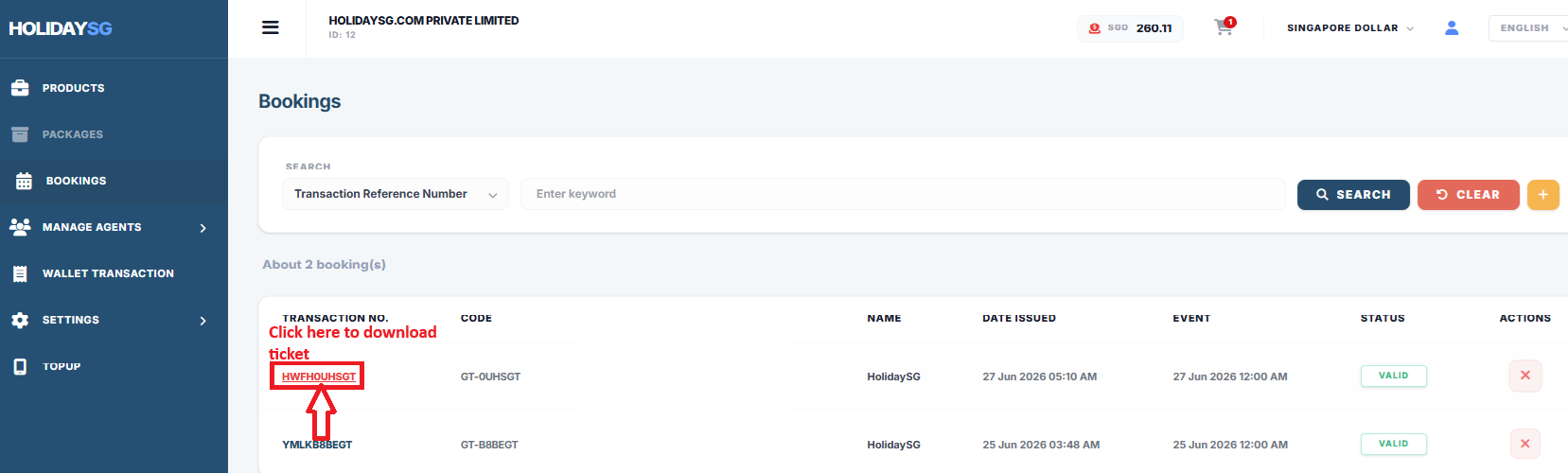
You’ll see a search bar labeled Transaction Reference Number — use it to find specific bookings quickly.
2️⃣ View Booking Details
Each booking entry includes:
Column
Description
Transaction No.
Unique ID for each booking
Code
Internal booking code
Name
Partner or client name
Date Issued
When the booking was created
Event Date
Scheduled travel or attraction date
Status
Indicates if the booking is valid or cancelled
Actions
Manage or cancel bookings using the red “X” button
3️⃣ Monitor Booking Status
VALID means the booking is confirmed and active.
CANCELLED or EXPIRED (if shown) means the booking is no longer valid.
Always verify the Event Date before confirming with your client.
4️⃣ Search & Filter
Use the Search and Clear buttons to find transactions by reference number.
This helps you quickly locate specific bookings without scrolling through the entire list.
5️⃣ How to download booking
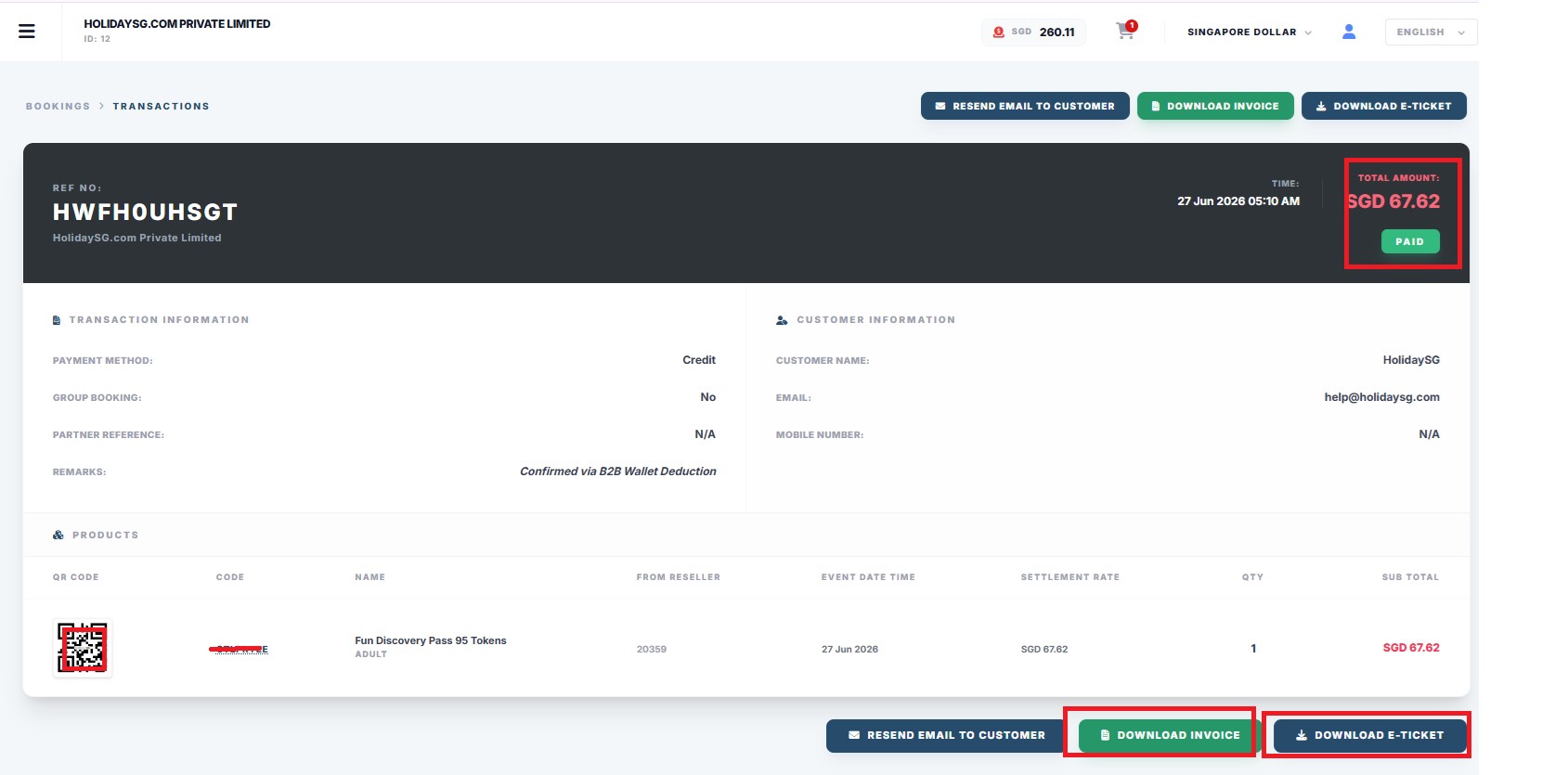
Click on Transaction reference no.
On next page, following information can be seen:
💳 Transaction Information — shows payment method, group booking status, partner reference, and remarks (Confirmed via B2B Wallet Deduction).
👤 Customer Information — includes customer name, email, and mobile number.
🎟️ Product Details — highlights QR code, product name (Fun Discovery Pass 95 Tokens), reseller code, event date/time, settlement rate, quantity, and subtotal.
✅ Payment Status — total amount (SGD 67.62) marked as PAID.
📩 Action Buttons — Resend Email to Customer, Download Invoice, and Download E‑Ticket for post‑booking management.
Where each kind of record lives
Portal section
What you will find there
Bookings
Everything currently live, with its reference and status.
Booking history
The full archive once travel has passed, searchable by reference.
Orders
The order behind a booking — what was paid, and how.
Credit / wallet
Top-ups and every debit, so a disputed charge can be traced to a booking.
Reports
Downloadable summaries for your own reconciliation.
Ferry bookings
Ferry sailings are listed separately because they carry passenger details.
Hotel bookings
Hotel reservations and their status.
Reconciling a charge
Work from the wallet, not from memory. Every debit in Credit ties back to an order, and every order ties back to a booking reference, so a figure you do not recognise can be followed in two steps. If the two still disagree, send us the booking reference rather than a screenshot of the total — the reference is what we can trace.
Cancellations and changes
Cancellation terms are set by the supplier of each product, not by us, and the applicable terms are shown on the product before you pay. There is no single blanket policy across the catalogue, so check the product rather than assuming — and for anything already ticketed, contact us with the reference instead of cancelling from the portal.
Staff and sub-agent bookings appear under the company account, so you see your team's activity in one place.
Your display currency is a per-user setting; the wallet itself settles in SGD.
Important: Some of the links recommended here are paid placements or have sponsored our stay in one way. We have paid for these accommodations ourselves. If you book through any of our links, we make a small commission at no extra cost to you. This helps keep our site running – so thank you in advance for your support!
Written by
HolidaySG Travel Team
Singapore-based travel specialists covering attractions, tours and travel experiences across Asia-Pacific and beyond. Licensed travel agency (TA04014).
This conversation was resolved. Reply below to continue, or
We use cookies
We use cookies to enhance your browsing experience, serve personalised content, and analyse our traffic. By clicking "Accept All", you consent to our use of cookies.
Read our Cookie Policy